

Expression Web 4.0 Add-ins - Installing Expression Web 4 Add-ins
What is an Expression Web Add-in?
An Expression Web Add-in, is an external software package that provides additional or enhanced functionality within Expression Web 4.
How to Install Add-ins?
NOTE: Many of the commercial add-ins come as an executable file. Once you have downloaded the add-in, double click the .exe file and follow the instructions for that particular add-in.
Step 1: Launch Expression Web 4.0. Go to 'Tools' on the menu and select 'Add-Ins.'

Step 2: In the 'Manage Add-ins' dialog box click the 'Install' button.
NOTE: If this is the first Add-in you have installed, the list will not yet be populated.
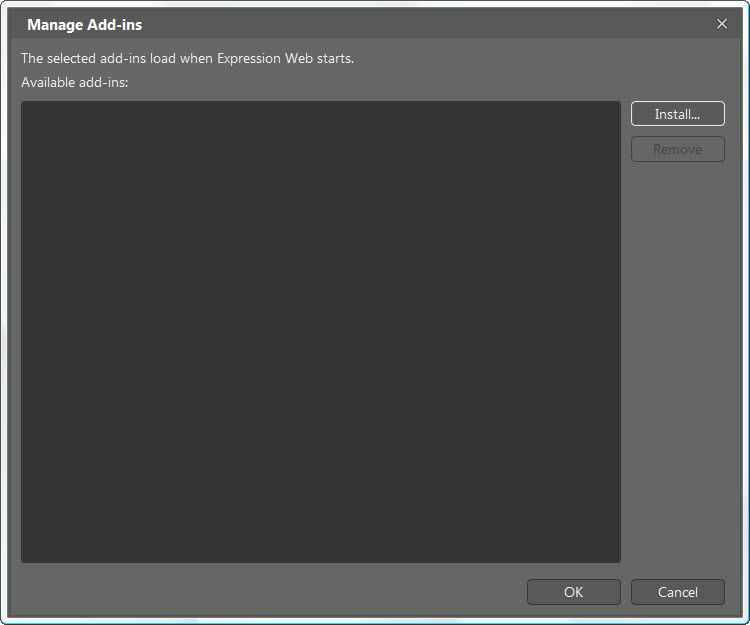
Step 3: Browse to the location on your computer where you downloaded the Add-in. Click 'Open.' The add-in will end with the file extension .xadd. The add-in will be installed.
Step 4: Once installed, you will be asked if you want to enable the add-in. The screen will give you all of the information on the particular add-in you are installing. Click 'Yes.'

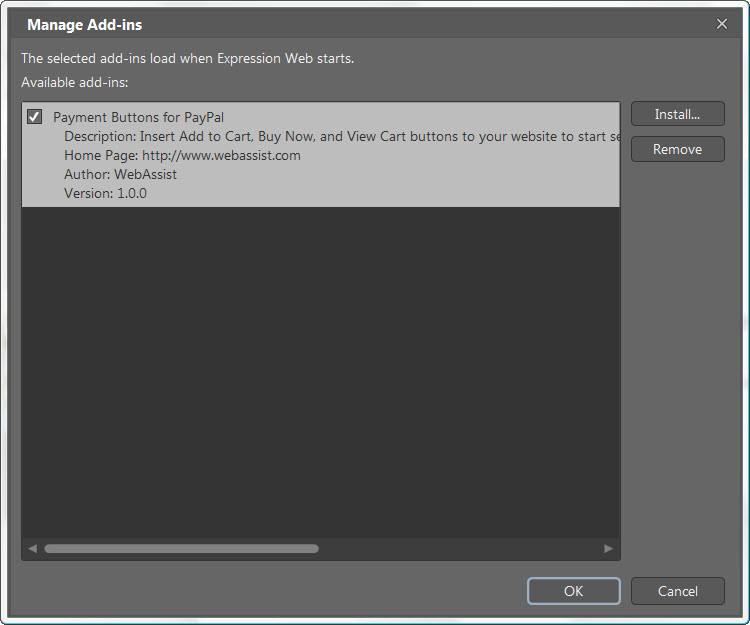
Step 5: If you once again click 'Tools' on the menu bar and select 'Add-ins' you will see the list has now been populated with your first add-in.
Using the Expression Web Add-ins
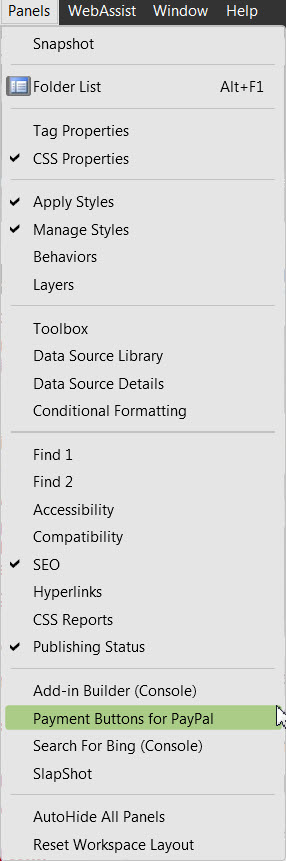
Step 6: Depending on the add-ins you have installed, they will be available at a number of locations. Go to 'Panels' and select the Add-in. In this case Payment Buttons for PayPal.
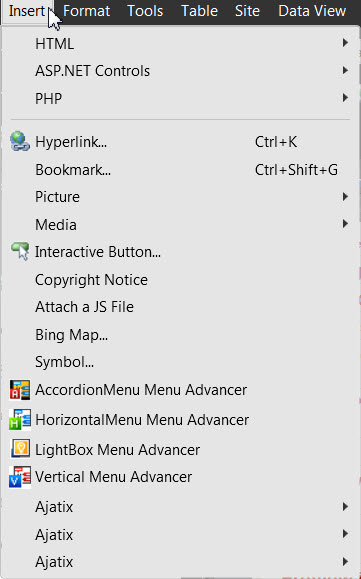
Go to 'Insert' and select the Add-in.
It is as simple as that.
Expression Web Free Add-ins
FPCleaner
Steve Easton’s FPCleaner supports FrontPage (2000-2003), Expression Web (all versions) as well as SharePoint Designer 2007. Best of all this program is FREE. It is one of the programs I have consistently recommended if you have problems with the FrontPage and/or Expression Web as it cleans up the clutter of files that are left behind. It does not require installation and runs from your desktop. This is one of the essential tools in my arsenal of tools for web design work.
FPCleaner supports
FrontPage 2000-2003, Expression Web 1.0 and 2.0, and Sharepoint Designer 2007
FPCleaner Expression Web 3.0 supports Expression Web 3.0.
FP Cleaner for Expression Web 4.0 supports Expression Web 4.0.
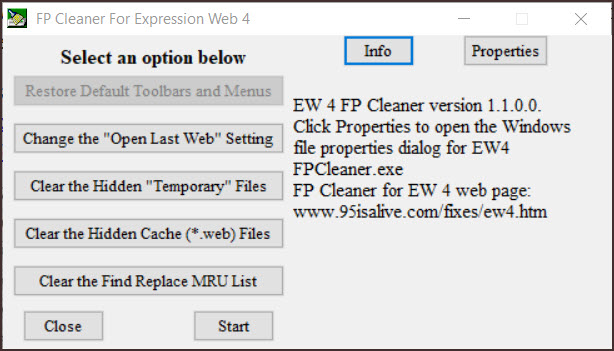
- The top button ‘Restore Default Menus and Toolbars‘ is not available as the ability to customize the toolbars is not available in EW 4.
- Change the ‘Last Web Open Setting‘ allows you to change that setting to ensure the program is not trying to open a web when it starts. This can be useful if you have EW is set to open the last web edited and that web has a problem.
- ‘Clear the Hidden Temporary Files‘ checks for the location of the hidden Temporary directory for the logged on User, if the directory exists, pressing this button clears it and moves the files to the Recycle Bin. Files left behind in these directories by an improper computer or program shut down will cause problems when trying to open, save, and/or edit pages on your web site.
- ‘Clear the Hidden Web Cache files (*.web)’ – There is a .web file for each of your webs and if these files become corrupted, you may encounter problems opening or closing your web. Clicking this button deletes these files and forces creation of new clean files when each web is opened or published.
- ‘Clear the Find/Replace MRU List‘ clears the Most Recently Used ( MRU ) list of Find/Replace entries.
- Clicking ‘Start‘ will Launch Expression Web 4 (No longer works to start the program.
- Clicking ‘Close‘ closes FP Cleaner for Expression Web 4 without starting the program.
- Clicking ‘Properties‘ opens the Windows file properties dialog for EWFPCleaner.exe.
- Clicking ‘Info‘ displays the basic information text.
Expression Web V4 Add-Ins by Ian Haynes
Each of these can be downloaded for FREE. See Expression Web V4 Add-Ins by Ian Haynes
- Show Hide
- WinPop Add-In
- WordPaste Add-In
- 'Close All' Add-In
- Copyright Notice Add-In
- Sub / Sup Text Add-In
Ian also offers a number of code snippets that can be download from the same site.
- Wrapping Snippets
- Meta Tags
- Robots Meta Tags
- Lorem Ipsum filler text
- Mobile Snippets
- CSS3 vendor-specific style properties
Expression Web 4.0 Commercial Add-ins
The add-ins made by both Ajatix and CSSMenuTools work with all versions of Expression Web as well as FrontPage.
- Email Spam Blocker Expression Web Add-In by Ajatix
- Maps & Directions - Expression Web Add-In by Ajatix
- Advanced CSS Drop Down Menu Expression Web by Ajatix. You can see a sample of this menu used on my FREE Ocean Template.
- Pure CSS Menu Expression Web by Ajatix - A tutorial on how to use the CSS Menu Add-in with sample templates. (This Expression Web Add-in works with all versions of Expression Web as well as Microsoft FrontPage 2003, 2002, 2000.)
- Lightbox Expression Web by Ajatix - A tutorial on how to add the lightbox to your site and an example gallery. (This Expression Web Add-in works with all versions of Expression Web as well as Microsoft FrontPage 2003, 2002, 2000.)
- Banner/Image Rotator by Ajatix - A tutorial on how to use the Banner/Image Rotator with examples. (This Expression Web Add-in works with all versions of Expression Web as well as Microsoft FrontPage 2003, 2002, 2000.)

Copyright © 2010 Pat Geary of
Expression Web Tutorials and Templates, All Rights Reserved
Written June 2010 Revised July 2012
Revised April 2013
Updated October 2019
Updated: July 2020
Expression Web 4.0 Tutorials 2nd Edition from Install to Publish, a FREE EBook by Pat Geary.

Expression Web has a group on Facebook. If you are a FB user, come join us.

Disclosure: This is an affiliate link, which means that if you visit Bluehost.com through this link and purchase this product, I’ll get a commission.

April 2007 - April 2013