

Expression Web Preview in Browser
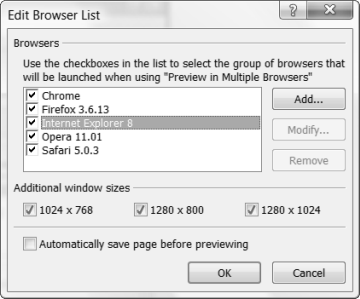
Before you can preview your work in browsers other than the default installed on your computer, you must edit the browser list.
File > Preview in Browser > Edit Browser List
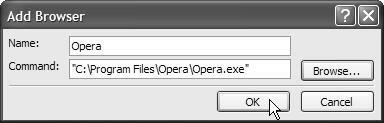
Add whichever browsers you have installed on your system by clicking the Browse button and navigating to the .exe file for that browser. The location is going to depend on your operating system. Select the resolutions you want. Click OK.
On a Windows Vista system:
- Opera: "C:\Program Files\Opera\Opera.exe"
- Firefox: "C:\Program Files\Mozille Firefox\firefox.exe"
- Safari: "C:\Program Files\Safari\safari.exe"
- Internet Explorer: "C:\Program Files\Internet Explorer\iexplore.exe"
- Chrome: "C:\Users\Patricia\AppData\Local\Google\Chrome\Application\chrome.exe"
On a Windows 7 64 bit system:
- Opera: "C:\Program Files (x86)\Opera|opera.exe"
- Firefox: "C:\Program Files (x86)\Mozille Firefox\firefox.exe"
- Safari: "C:\Program Files (x86)\Safari\safari.exe"
- Internet Explorer: "C:\Program Files (x86)\Internet Explorer\iexplore.exe"
- Chrome: "C:\Users\Patricia\AppData\Local\Google\Chrome\Application\chrome.exe"
On a Windows 10 64 bit system:
- Opera: C:\Users\patge\AppData\Local\Programs\Opera\launcher.exe
- Chrome: "C:\Program Files (x86)\Google\Chrome\Application\chrome.exe"
- Internet Explorer: "C:\Program Files\Internet Explorer\iexplore.exe"
- Microsoft Edge: "C:\Program Files (x86)\Microsoft\Edge\Application\msedge.exe"
And, YES, the quote marks at the beginning and end of the file path are required.
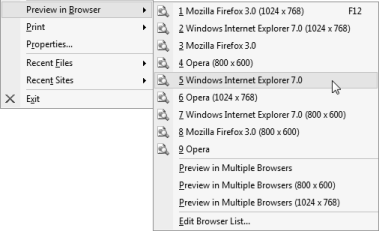
If you use the F12 key to Preview your page, it will open the last browser used. If you want to preview the page in other or multiple browsers File > Preview in Browser and make your choices from the list.

Copyright © 2011 Pat Geary of
Expression Web Tutorials & Templates All Rights Reserved
Revised: January
2011
Expression Web 4.0 Tutorials 2nd Edition from Install to Publish, a FREE EBook by Pat Geary.

Expression Web has a group on Facebook. If you are a FB user, come join us.
Disclosure: This is an affiliate link, which means that if you visit Bluehost.com through this link and purchase this product, I’ll get a commission.

April 2007 - April 2013