

Code Snippets in Expression Web
One of the features I really appreciate in Expression Web is Code Snippets. When you want to quickly insert code that you often use, you can create a code snippet for that code. You can also modify or delete the code snippets that you've created or the code snippets that are provided by the program.
Expression Web 4 SP2 Code Snippets
You can access the 'Snippets' Panel from the top menu Panels > Snippets OR use the Ctrl + Enter keys to open the snippets panel. You can have it floating or dock it wherever you want. I have mine docked along the right side of my workspace along with the toolbox panel for easy access.
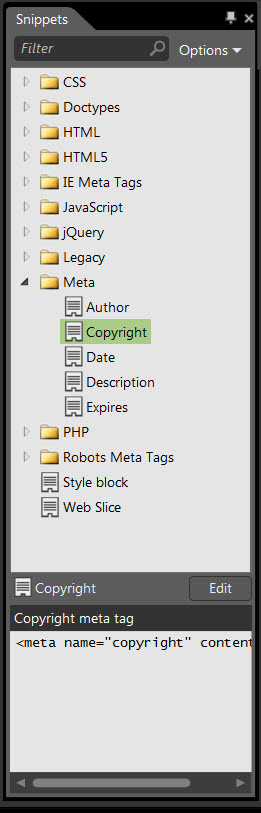
Fig 1 - Code Snippets Panel - Click for
full image.
If you had any of your own custom snippets in version 4, they will be imported into the new snippets panel in a Legacy group.
Each of the snippets comes with a brief description of what it does. You can only insert code snippets from Code View. They do NOT work in Design View. The Preview window will show you some or all of the snippet being inserted.
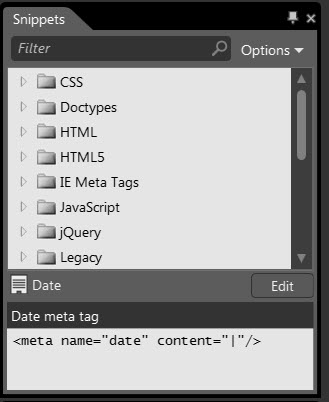
Fig 2: - Code Snippets Preview
The Options tab dropdown allows you to work with the Snippets. You can use the Filter box to filter out snippets.
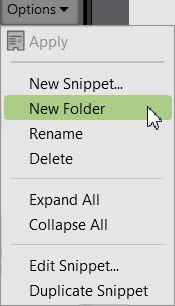
Fig 3: - Code Snippets options
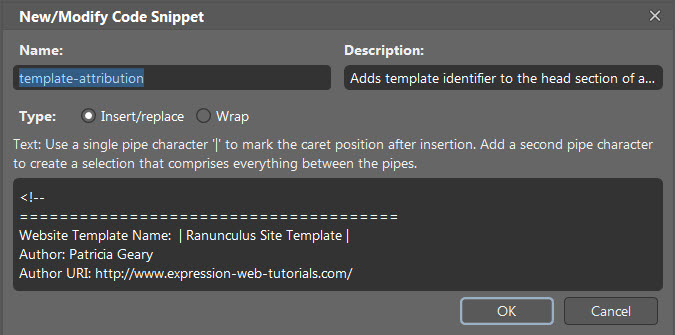
You can add or modify any of the snippets by selecting the New Snippet or Edit Snippet option. The New/Modify Code Snippet dialog box appears. Insert/replace is selected by default.
To create or modify a code snippet
- On the Panels menu, click Snippets.
- In the Snippets panel, do one of the following:
- To create a code snippet, click Options and then click New Snippet.
- To modify a code snippet, click the code snippet you want to edit, and then click Modify.
- In the New/Modify Code Snippet dialog box, do the following:
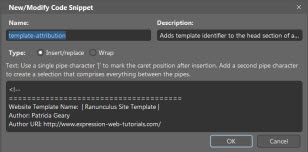
Fig 4: - New/Modify Code Snippets dialog
Click thumbnail for larger image.
Use this To do this Name Type a unique name for the code snippet that you can subsequently type to select the code snippet in the list of code snippets. Description Type a description to identify the code snippet. Type Choose how the snippet will be added to the code:
- Select Insert/replace for a snippet that will be inserted at the cursor, replacing any selected text.
- Select Wrap for a snippet that will be inserted around the selected text, leaving the selected text intact.Text Type the code that will be inserted when you select the code snippet. If your code snippet contains text that must be updated, place "pipe" (|) characters before and after the text to be replaced. In the Code view, that text is highlighted. Code before Type the code that will be inserted before the selected text. Code after Type the code that will be inserted at the end of the selected text.
To insert a code snippet
In Code view, place your cursor where you want to insert the code snippet, and then on the Snippets panel, right-click the snippet you want to add and then click Apply Snippet.
To wrap a selection in a code snippet
The Wrap option to the right of the Insert/replace option will wrap the selected text with the snippet.
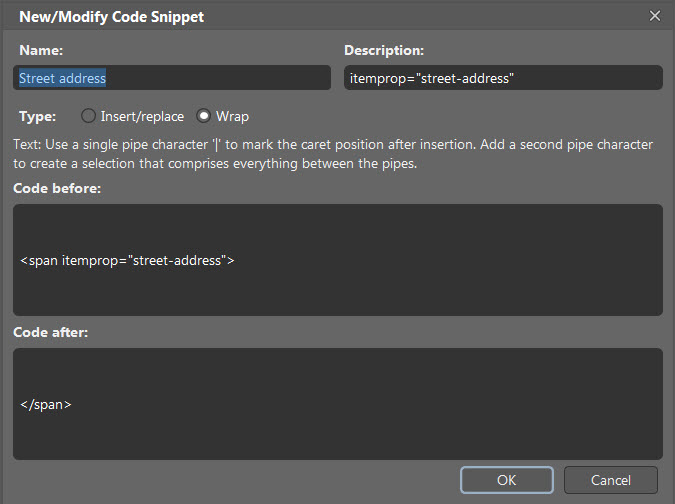
Fig 5: - Snippets Wrap option.
Click
thumbnail for a larger image.
The snippet above wraps the code you select with an HTML5 Microdata 'street-address' item property.
<span itemprop="street-address">1183 Nelson Dr.</span>
To delete a code snippet
- On the Panels menu, click Snippets.
- In the Snippets panel, select the snippet to be deleted.
- Click Options and then click Delete.
To manage code snippets
You can organize snippets by folder inside the Snippets panel.
- On the Panels menu, click Snippets.
- To add a new folder, click Options and then click New Folder. To delete a folder, select the folder you want to delete, click Options, and then click Delete.
- Drag and drop individual snippets to organize them according to your needs.
Code Snippets You Might Find Useful
- CSS Tricks has an entire gallery of Code Snippets including CSS, HTML, HTAccess, JavaScript, JQuery, PHP, and WordPress
- HTML-Ipsum is a Lorum Ipsum snippets site for adding dummy content to your web designs. This is particularly if you create templates for others to use.
- Snipplr lets your store and share all of your commonly used pieces of code and HTML with others.
- 45+ Excellent Code Snippet Resources and Repositories from Smashing Magazine
If you have ever had to reinstall Expression Web and lost your code snippets, you can get them back or move them from one version of EW to another version. Read How - Code Snippets in Expression Web.

Updated &
Revised: August 2011
Expression Web 4.0 Tutorials 2nd Edition from Install to Publish, a FREE EBook by Pat Geary.

Expression Web has a group on Facebook. If you are a FB user, come join us.

Disclosure: This is an affiliate link, which means that if you visit Bluehost.com through this link and purchase this product, I’ll get a commission.

April 2007 - April 2013